
Technology & Practice
How Real-Time AI Interview Copilots Work: Audio Streaming, Latency, and Live Prompting

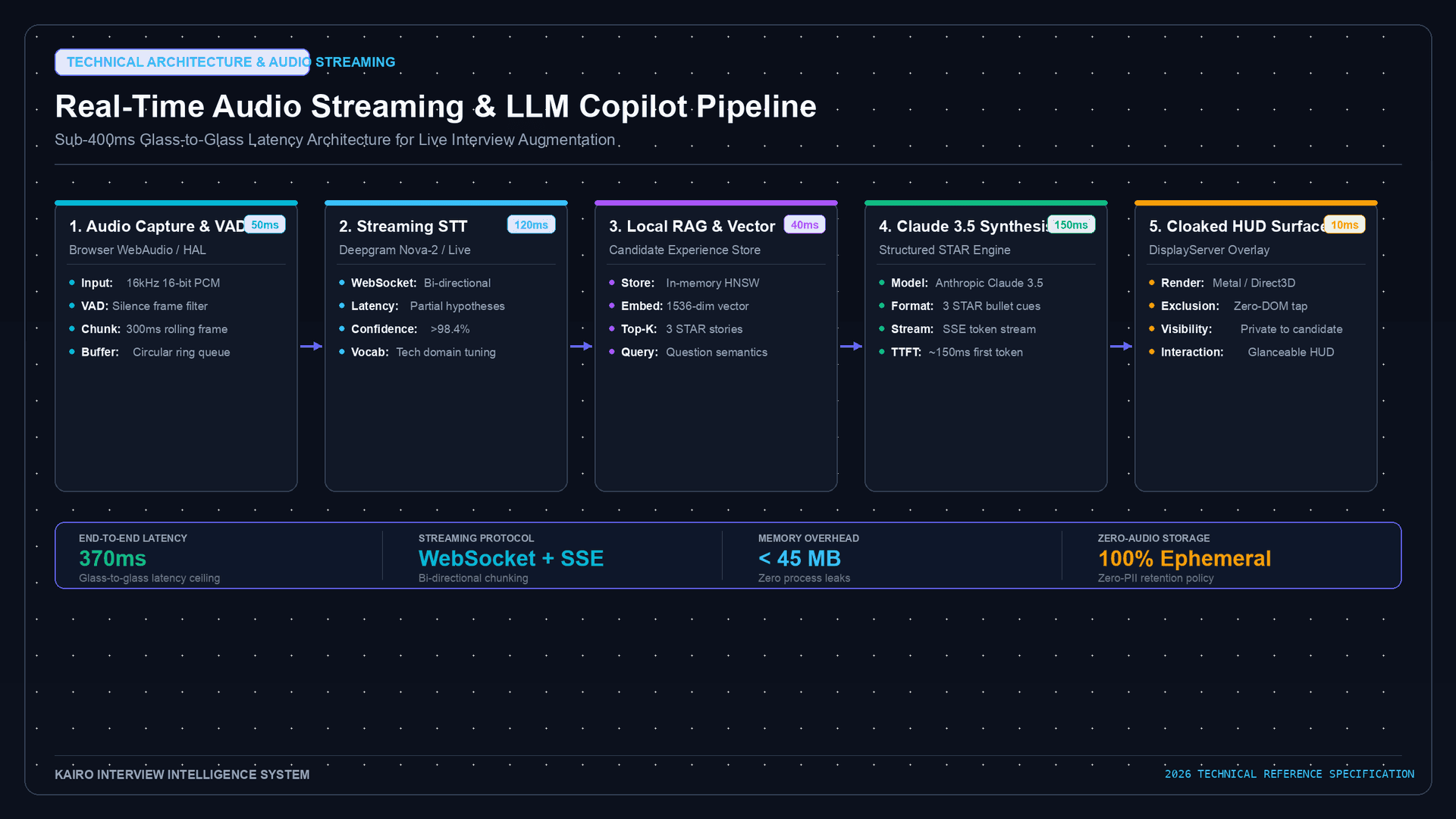
When a candidate opens Kairo and joins a video call, something quietly remarkable is happening in the background: continuous audio capture, low-latency speech-to-text transcription, a language model interpreting the question semantics in real time, and a structured suggestion surfacing on screen — all within roughly 1.5 to 3 seconds of the interviewer finishing their sentence.
Most candidates experience this as a HUD whisper. The engineering behind it is a layered pipeline of microphone capture, streaming STT, LLM inference, and context-aware retrieval.
This article breaks down every layer.
Layer 1: Continuous Audio Capture
Real-time interview copilots begin with low-latency microphone access via the browser Web Audio API or a native OS audio tap. On macOS, this typically means a virtual audio driver or the CoreAudio HAL. On Windows, WASAPI loopback capture is common.
The key constraint is chunk size. Audio is chunked into frames — typically 250ms to 500ms windows — before being streamed upstream to the transcription layer. Smaller chunks reduce perceived latency but increase API call overhead. Most production copilots settle on 300ms–500ms rolling windows with 50–100ms overlap to preserve word boundaries at frame edges.
AUDIO PIPELINE — SIMPLIFIED

Microphone input
    ↓
VAD (Voice Activity Detection)  ← Discards silence frames
    ↓
PCM encoding (16-bit, 16kHz mono)
    ↓
Chunked websocket stream  ← 300-500ms frames
    ↓
Cloud STT service (or local model)
Voice Activity Detection (VAD) is critical here. Without it, every frame — including silence — is sent upstream, tripling unnecessary API calls and saturating the inference queue.
Layer 2: Streaming Speech-to-Text Transcription
The transcription layer converts PCM audio chunks to partial text hypotheses. This is where latency is won or lost.
Streaming STT (as opposed to batch transcription) produces partial transcripts as speech arrives rather than waiting for a complete utterance. Deepgram, AssemblyAI, Azure Speech, and Google Speech-to-Text all offer streaming endpoints. The output looks like this:
t=0.0s   [partial]  "Tell me about a time"
t=0.4s   [partial]  "Tell me about a time when you"
t=0.9s   [partial]  "Tell me about a time when you had to work"
t=1.3s   [final]    "Tell me about a time when you had to work under pressure."
The [final] signal — emitted when the STT model detects end-of-utterance — is the trigger for the LLM layer. On average, streaming STT adds 0.3s–0.8s of latency before a finalized transcript is available.
Word Error Rate (WER) matters significantly for technical interviews. A transcription error on "Kubernetes" or "eventual consistency" can produce a contextually irrelevant prompt. Production copilots implement domain vocabulary biasing — injecting technical wordlists into the STT engine to improve accuracy on specialized terminology.
Layer 3: Semantic Intent Classification
The finalized transcript doesn't go straight to an LLM. A lightweight classification step first determines question type:
- Behavioral: "Tell me about a time when…", "Give me an example of…"
- Technical: "How would you design…", "Walk me through…", "What's the difference between…"
- Situational: "What would you do if…", "How would you handle…"
- Competency: "What's your approach to…", "How do you prioritize…"
This classification routes the transcript to the appropriate prompt template before LLM inference. It's typically a fine-tuned small classifier (BERT-class) or a regex/pattern heuristic — not a full LLM call — because it needs to resolve in under 50ms.
The intent class is then passed alongside the transcript as part of the LLM context window.
Layer 4: LLM Inference and Context Assembly
The core intelligence layer is a language model — typically GPT-4o, Claude Sonnet, or a fine-tuned open-source model depending on the vendor's stack.
The prompt sent to the LLM is not just the raw question. It includes:
SYSTEM: You are an interview coach helping a candidate in a live interview.
        Surface concise, structured talking points. Never fabricate facts.
        Use only what you know about the candidate.

CONTEXT:
  - Candidate profile: [resume highlights, role, company target]
  - Interview type: behavioral
  - Prior conversation: [last 2-3 turns of transcript]

USER: Interviewer just asked: "Tell me about a time when you had to work under pressure."

Generate 3 structured STAR bullet points the candidate can use.
The assembled context window is critical. A copilot that ignores prior conversation turns will produce generic suggestions. One that tracks the full dialogue history surfaces progressively more relevant guidance as the interview advances.
Streaming LLM output is essential for UX. Using token streaming (SSE or websocket), suggestions begin appearing on the candidate's screen after the first 3–5 tokens — usually within 0.8s–1.2s of the LLM call being made. The candidate sees words accumulating in real time, not a blank screen followed by a wall of text.
Layer 5: Context-Aware Retrieval (RAG Layer)
High-fidelity copilots layer Retrieval-Augmented Generation on top of the base LLM call. Rather than relying solely on the LLM's parametric knowledge:
- The candidate's resume, portfolio notes, and project highlights are pre-embedded into a vector store at onboarding.
- On each question, a semantic similarity search retrieves the 3–5 most relevant candidate experiences.
- These are injected into the LLM context alongside the question.
This is what makes the difference between a generic "here's a STAR framework explanation" and a suggestion like "Recall your Q3 2024 incident at CompanyX where you led the on-call rotation during the payment gateway outage."
The retrieval step adds roughly 100–200ms but dramatically improves suggestion relevance and keeps the copilot grounded in the candidate's actual history.
End-to-End Latency Budget
Summing the layers:
| Layer | Typical Latency |
|---|---|
| Audio chunk capture + VAD | 300–500ms |
| Streaming STT (to final transcript) | 300–800ms |
| Intent classification | 20–50ms |
| RAG retrieval | 100–200ms |
| LLM first token (streaming) | 400–900ms |
| Total to first word on screen | ~1.1s–2.4s |
This means a candidate sees the beginning of a suggested talking point within 1–2.5 seconds of the interviewer completing their question — fast enough that it's usable before a natural pause ends.
The HUD Surface
Where suggestions appear matters as much as how fast they arrive. The copilot UI needs to be:
- Off the shared screen — positioned on a secondary monitor, a portion of the display excluded from screen capture, or in a picture-in-picture overlay.
- Scannable, not readable — bullet points and fragment starters, not full paragraphs. The candidate glances, not reads.
- Dismissible immediately — keyboard shortcut or hover-to-hide removes suggestions without mouse clicks mid-conversation.
Kairo surfaces suggestions in a floating sidebar that integrates with macOS's Stage Manager and Windows virtual desktop isolation, keeping the assist layer outside the video call's capture boundary.
What Real-Time AI Copilots Don't Do
It's worth being explicit about what a well-built interview copilot does not do:
- It does not speak for the candidate. No text-to-speech output in the interviewer's audio channel.
- It does not fabricate credentials, titles, or results the candidate hasn't actually achieved.
- It does not override the candidate's own judgment — suggestions are prompts, not scripts.
- It does not produce code during a live proctored coding assessment (a distinct ethical boundary).
The architecture is ambient memory + structural scaffolding. The interview remains a genuine conversation driven by the candidate.
Why Latency Is a Trust Signal
A copilot that responds in 4–5 seconds is not just slow — it's disruptive. The candidate finishes their pause, starts forming their own answer, then the suggestion arrives and creates cognitive interference.
Sub-2-second end-to-end latency keeps the copilot in the background. The candidate processes the suggestion during the natural 1–2 second breath before responding. That's the design target: fast enough to inform, invisible enough to not interrupt.
This is the engineering challenge that separates a prototype from a production interview tool — not the LLM quality, but the latency architecture around it.
For candidates preparing for technical and behavioral panels, understanding how your tools work is part of using them responsibly. A real-time copilot is most effective when you've already done the preparation work — the AI surfaces your own history, structured into frameworks you've internalized. The architecture described here serves recall, not replacement.
Accelerate Your Real-Time Interview Preparation
Mastering high-stakes technical and behavioral interviews requires authentic retrieval practice and situational confidence.
- Experience Real-Time AI Copilot Guidance: Explore Kairo Live AI Interview Copilot to see how sub-second streaming audio prompts work in practice.
- Explore Flexible Access & Plans: Compare features on the Kairo Pricing & Plans page.
- Practice Real-Time Behavioral Scaffolding: Review proven framework cues with the Role-Specific Interview Questions Library.
- Read More on Ethics & Detection: