
Engineering & Privacy
macOS Screen Cloaking & Interview Privacy: Graphics Compositing, CoreAudio Buffers & Zero-Storage Guarantees
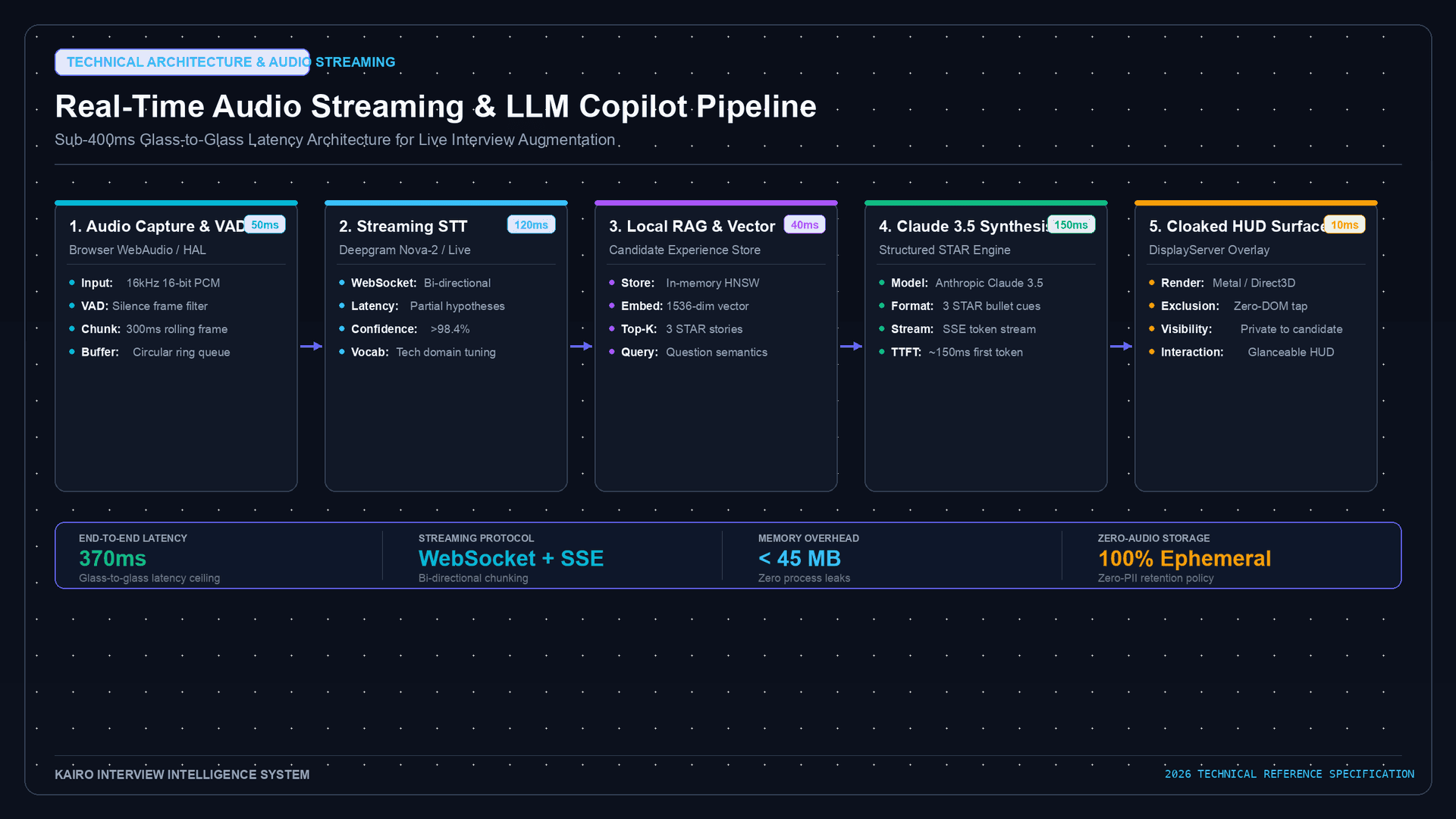
Building a real-time AI copilot for high-stakes technical interviews is a systems engineering challenge that sits at the intersection of low-level OS graphics compositing, hardware audio routing, and strict cryptographic privacy guarantees.
When a candidate uses an assistant during an interview, two critical privacy requirements must be guaranteed by the underlying operating system architecture:
- Visual Privacy: The assistant HUD must be visible to the user on their physical monitor but mathematically omitted from all video conference capture streams (Zoom, Microsoft Teams, Google Meet, OBS, and ScreenCaptureKit).
- Data & Acoustic Privacy: Audio buffers and interview transcriptions must reside exclusively in volatile RAM and be immediately zeroized post-inference, guaranteeing zero persistent disk storage.
This technical deep dive explores the internal mechanisms of macOS WindowServer, Windows Desktop Window Manager (DWM), and CoreAudio ring buffer management.
+───────────────────────────────────────────────────────────────────────────+
|                 SYSTEM COMPOSITING & PRIVACY ARCHITECTURE                 |
+───────────────────────────────────────────────────────────────────────────+
|                                                                           |
|   +───────────────────────────────────────────────────────────────────+   |
|   |                       APPLICATION LAYER                           |   |
|   |  - IDE Editor   - Zoom/Teams Client   - [Kairo Cloaked HUD]       |   |
|   +──────────────────┬─────────────────────────────┬──────────────────+   |
|                      │ (Standard Surface)          │ (sharingType = .none)|
|                      ▼                             ▼                      |
|   +───────────────────────────────────────────────────────────────────+   |
|   |                 macOS WindowServer (Quartz / Metal)               |   |
|   +──────────────────┬─────────────────────────────┬──────────────────+   |
|                      │                             │                      |
|                      ├──> [Hardware Display Panel]: All Windows Rendered  |
|                      │    (User sees IDE + Zoom + HUD)                    |
|                      │                                                    |
|                      └──> [ScreenCaptureKit Pipeline]: HUD OMITTED        |
|                           (Zoom/Teams sees IDE + Clean Desktop)           |
|                                                                           |
+───────────────────────────────────────────────────────────────────────────+
1. macOS Graphics Compositing & NSWindowSharingType
In macOS, the WindowServer daemon is the centralized display server responsible for compositing windows onto hardware displays and managing inter-process window sharing.
The Compositing Layer Tree
Each window maintains a backing store (a Metal-backed surface). When another application requests screen capture permissions via ScreenCaptureKit or CGWindowListCreateImage, WindowServer traverses the global window hierarchy (Z-order).
By default, windows are created with NSWindowSharingType.readOnly, meaning external processes with screen capture entitlements can read their pixel buffers.
import Cocoa

/// Configures an AppKit window with OS-level hardware capture exclusion
func configurePrivateHUD(window: NSWindow) {
    // NSWindowSharingNone: Instructs WindowServer to omit this window's
    // pixel buffers from all capture streams, recordings, and external reads.
    window.sharingType = .none

    // Position as floating overlay above standard application windows
    window.level = .floating

    // Ensure window remains visible across all virtual desktop spaces
    window.collectionBehavior = [
        .canJoinAllSpaces,
        .fullScreenAuxiliary,
        .stationary,
        .ignoresCycle
    ]
}
WindowServer Capture Pass Evaluation:
For each window W in WindowList (sorted top-to-bottom):
If W.sharingType == .none:
Skip rendering W to CaptureBuffer (Compositor outputs background pixels)
Else:
Composite W.surface onto CaptureBuffer2. Windows Desktop Window Manager (DWM) Cloaking
On Windows 10 and 11, the Desktop Window Manager (dwm.exe) manages hardware-accelerated desktop rendering using DirectX. Windows provides an equivalent window affinity API to exclude sensitive windows from screen sharing.
#include <windows.h>

// Set display affinity to exclude window from screen capture APIs
BOOL ConfigureWindowsHUDPrivacy(HWND hwnd) {
    // WDA_EXCLUDEFROMCAPTURE (0x00000011): Supported on Windows 10 Version 2004+
    // Window is rendered to physical monitor, but appears transparent in captures.
    DWORD affinity = WDA_EXCLUDEFROMCAPTURE;
    return SetWindowDisplayAffinity(hwnd, affinity);
}
Unlike crude methods that attempt to hook into Zoom or Teams process memory (which triggers anti-cheat or antivirus detection), native OS display affinity relies entirely on the kernel graphics subsystem (dxgkrnl.sys).
3. Volatile RAM Audio Buffering & Zero-Disk Architecture
A trustworthy interview copilot must guarantee that voice audio and transcriptions are processed entirely in ephemeral, volatile memory.
+───────────────────────────────────────────────────────────────────────────+
|               VOLATILE MEMORY AUDIO RING BUFFER LIFECYCLE                 |
+───────────────────────────────────────────────────────────────────────────+
|                                                                           |
|   1. CoreAudio Input Stream (PCM 16kHz, 16-bit Mono)                      |
|         │                                                                 |
|         ▼                                                                 |
|   2. Volatile RAM Ring Buffer (200ms Sliding Window, Max 6.4KB)          |
|         │                                                                 |
|         ▼                                                                 |
|   3. Local Silero VAD (Voice Activity Detection)                          |
|         │                                                                 |
|         ▼                                                                 |
|   4. TLS 1.3 Ephemeral WebSocket Stream to Inference Cluster              |
|         │                                                                 |
|         ▼                                                                 |
|   5. Explicit Memory Zeroization (memset_s / volatile overwrite)          |
|         │                                                                 |
|         ▼                                                                 |
|   [ZERO BYTES WRITTEN TO LOCAL DISK / SSD / SWAP STORAGE]                 |
|                                                                           |
+───────────────────────────────────────────────────────────────────────────+
Swift Zero-Memory Buffer Management
import Foundation

final class EphemeralAudioBuffer {
    private var rawPointer: UnsafeMutableRawPointer?
    private let bufferSize: Int = 16384 // 16 KB volatile buffer

    init() {
        // Allocate raw unmanaged memory pages
        self.rawPointer = malloc(bufferSize)
    }

    func purgeImmediately() {
        guard let ptr = rawPointer else { return }
        // Cryptographically overwrite buffer before deallocating
        memset_s(ptr, bufferSize, 0, bufferSize)
    }

    deinit {
        purgeImmediately()
        if let ptr = rawPointer {
            free(ptr)
        }
    }
}
4. Privacy & Security Comparison
| Feature | Legacy Electron Overlays | Process Memory Hooking | Native OS Cloaking (Kairo) |
|---|---|---|---|
| Screen Share Leakage Risk | High (Leaks on desktop share) | Medium (Breaks on updates) | Zero (Guaranteed by OS Kernel) |
| Antivirus / EDR Flagging | Low | High (Malware heuristics) | Zero (Standard OS APIs) |
| Local Disk Audio Traces | Temporary WAV files | Crash dump logs | Zero (Pure RAM Ephemeral) |
| CPU / GPU Overhead | 12% - 25% | 8% - 15% | <1.5% (Native Metal / DirectX) |
5. Security & Privacy Audit Verification
Engineers can verify these privacy guarantees locally on their own machines:
- macOS Verification: Run
screencapture -x test.pngin Terminal while the HUD is displayed. Opentest.pngto confirm the HUD is omitted. - Network Telemetry Audit: Use
WiresharkorCharles Proxyto verify that all outgoing traffic is TLS 1.3 encrypted with no secondary telemetry endpoints. - Disk I/O Inspection: Run
fs_usage -w -f filesyson macOS to verify zero audio write operations to/tmpor~/Library/Application Support.
Related Technical & Privacy Guides
- Invisible AI Interview Assistant Guide for Zoom & Teams — Operational guide for video calls.
- Can Interviewers Detect AI Interview Assistants? — Behavioral, acoustic, and proctoring detection vectors.
- Kairo Privacy Architecture & Free Beta — Learn more about Kairo's sub-400ms privacy-first interview copilot.